Showing posts with label error. Show all posts

Wednesday, 15 April 2020

Windows BCD error code 0x0000098


Windows BCD error and it works and your files will be safe

File:\BCD
Error code: 0x0000098


Note:
If you are using windows genuine version kindly insert the installation media and follow the below steps:
-Start up your computer with the USB or DVD Windows 10 recovery media.
-Select your language time format and keyboard and click next.
-Click (repair now) then (troubleshoot), windows will automatically try to repair your system.

If you are using non-licensed version:


Start your computer and enter F11 and select the trouble shoot option


select Command prompt and enter the below commands:

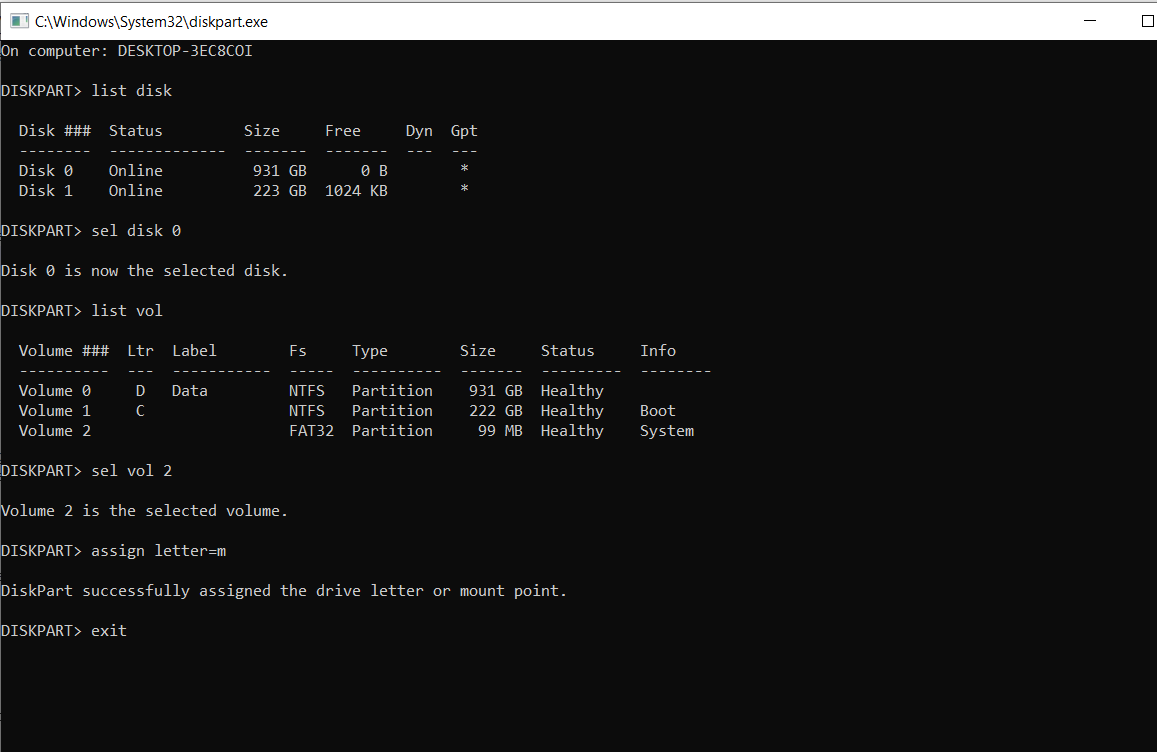
C:\diskpart 
and press enter.

DISKPART> list disk 
and press enter to know which drive to target.

DISKPART> sel disk 0 
assuming your drive with windows is disk 0 and press enter.

DISKPART> list vol 
to view all the partitions and press enter.

Select the EFI partition volume which is using FAT32 next to the NTFS volume

DISKPART> sel vol 2
to select the fat32 EFI volume and press enter.

DISKPART> assign letter=m 
to assign an arbitrary drive letter to it and press enter.

DISKPART> Exit 
to exit the diskpart tool and press enter.

> cd /d m:\EFI\Microsoft\Boot\  
press enter

> bootrec /fixboot 
press enter

> ren BCD BCD.old 
and enter to backup the existing Boot Configuration Data
(BCD) store.

> bcdboot c:\Windows /l en-us /s m: /f ALL 
press enter to recreate the BCD store.

Close the command prompt windows then turn off pc and restart the computer.


Sunday, 12 April 2020

parameters are of unsupported type sqlite python

Details:

This is one of the common error a beginner will be facing when he is working on Python and SQLite bridging. Below is a scenario provided for better understanding with example.

Error:

insert_data = "INSERT INTO users VALUES (?, ?, ?)"
    user = [
        {1"Ram""abc@123"},
        {2"Rahim""wel@123"},
        {3"Raju""pass@123"}
    ]
    cursor.executemany(insert_data, user)

When you run the above code you will get the error:
(venv) D:\python\Course_sample\source_database>python dataBase.py
parameters are of unsupported type

This is because when ever we try to insert into database from python, they data has to be a tuple.
In the above code you can see list of set which we try to insert.

Fixed:

#insert data query
    insert_data = "INSERT INTO users VALUES (?, ?, ?)"
    user = [
        (1"Ram""abc@123"),
        (2"Rahim""wel@123"),
        (3"Raju""pass@123")
    ]
    cursor.executemany(insert_data, user)

The above code will get executed and the data will get inserted into the database properly.

Sunday, 5 April 2020

list indices must be integers or slices, not str error in python

Below is an example to elaborate the error and for an better understanding.

Eg:

shops = [{
    "name""Anand Motors",
    "cars": [
        {
            "name":"Ferrari",
            "Price"25000
        },
        {
            "name""Benz",
            "price"15000
        }
    ]}  
]

The above dictionary is referred as list, when to try to access the dictionary data using string.

name = "Anand Motors"
print(shops[name])

The above code gives error.

Solution or fix:

name = "Anand Motors"
print(next(shop for shop in shops if shop["name"== name))

The above code will fix this error.


Tuesday, 31 March 2020

Error: No module named flask in python

Error: No Module named flask, for python application

(venv) C:\Python\sandbox>py -m flask run
C:\Python\sandbox\venv\Scripts\python.exe: No module named flask

When you try to run the python application using flask you may get the above error: 
root cause: There is no flask installation found in the directory you are currently trying to access the application.
Solution:
When you over come the above error first install flask using below command:
py -m pip install Flask

Then try: py -m flask run 

Now your system will recognize your command and run the flask application.

Sunday, 29 March 2020

Cannot read property 'nativeElement' of undefined angular 7

This error is one of the common error which we get when there is a mismatch in the typescript and html in Angular 7.

To avoid this error kindly notice the below code for reference

In example.component.ts        
@ViewChild("nameField")nameField:ElementRef;

In example.component.html
<input                      
             cdk-focus-initial 
             #nameField
             type="text" 
             placeholder="Service Name" 
             matInput
             [matAutocomplete]="auto" 
             formControlName="serviceName" 
             [(ngModel)]="serviceName"
             (input)="getserviceOnSearch()" 
  data-automation-attribute="text-service-name" />

Expense Handler Application with advance technologies

Budget Planner  One of the application developed with Ionic 4 and Python-Flask.  Ionic 4 code:  https://github.com/logeshbuiltin/Expense...