Windows BCD error and it works and your files will be safe
File:\BCD
Error code: 0x0000098

Note:
If you are using windows genuine version kindly insert the installation media and follow the below steps:
-Start up your computer with the USB or DVD Windows 10 recovery media.
-Select your language time format and keyboard and click next.
-Click (repair now) then (troubleshoot), windows will automatically try to repair your system.
If you are using non-licensed version:
Start your computer and enter F11 and select the trouble shoot option


select Command prompt and enter the below commands:
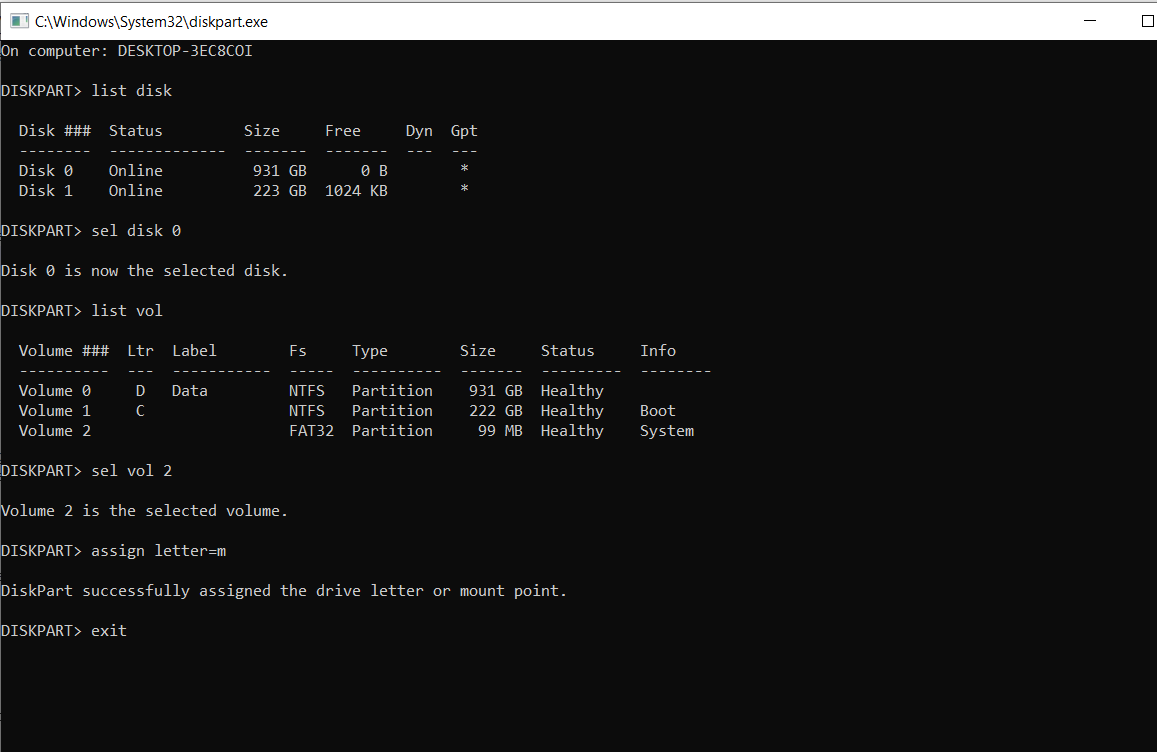
C:\diskpart
and press enter.
DISKPART> list disk
and press enter to know which drive to target.
DISKPART> sel disk 0
assuming your drive with windows is disk 0 and press enter.
DISKPART> list vol
to view all the partitions and press enter.
Select the EFI partition volume which is using FAT32 next to the NTFS volume
DISKPART> sel vol 2
to select the fat32 EFI volume and press enter.
DISKPART> assign letter=m
to assign an arbitrary drive letter to it and press enter.
DISKPART> Exit
to exit the diskpart tool and press enter.
> cd /d m:\EFI\Microsoft\Boot\
press enter
> bootrec /fixboot
press enter
> ren BCD BCD.old
and enter to backup the existing Boot Configuration Data
(BCD) store.
> bcdboot c:\Windows /l en-us /s m: /f ALL
press enter to recreate the BCD store.
Close the command prompt windows then turn off pc and restart the computer.
